📋 Activity Log
Purpose Monitor all important actions performed within the Garbage Billing platform.
Callouts
- Search
- Action Filter
- Date Filters
- Activity Register
- Activity Details
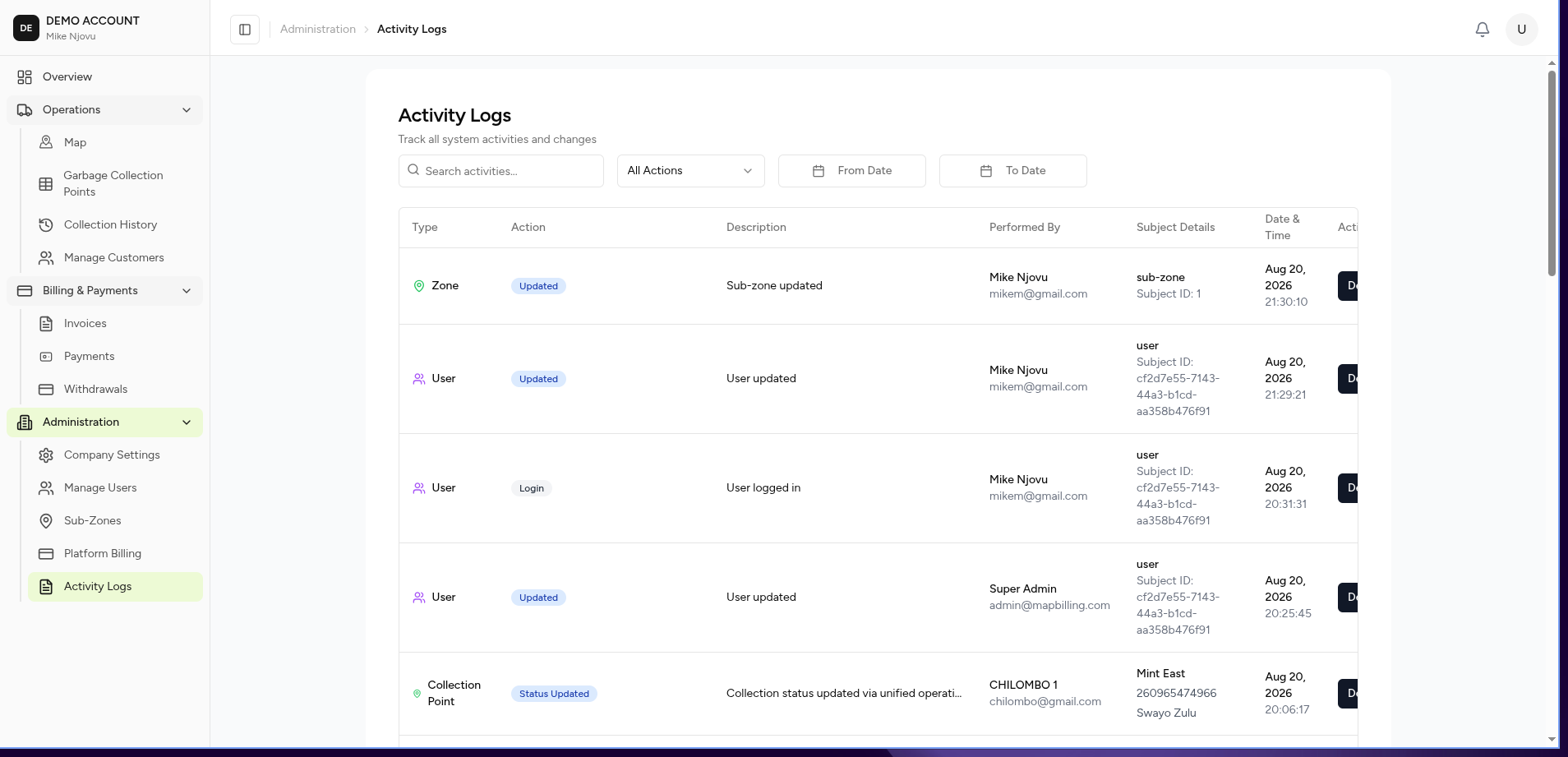
The Activity Log provides a complete history of important system events.
It helps administrators understand:
- Who performed an action.
- What was changed.
- When it happened.
- Which record was affected.
This supports accountability, troubleshooting, and auditing.
What You Can Do
From this page you can:
- Search activities
- Filter activities by action type
- Filter by date range
- Review activity details
- Investigate user actions
Screen Layout
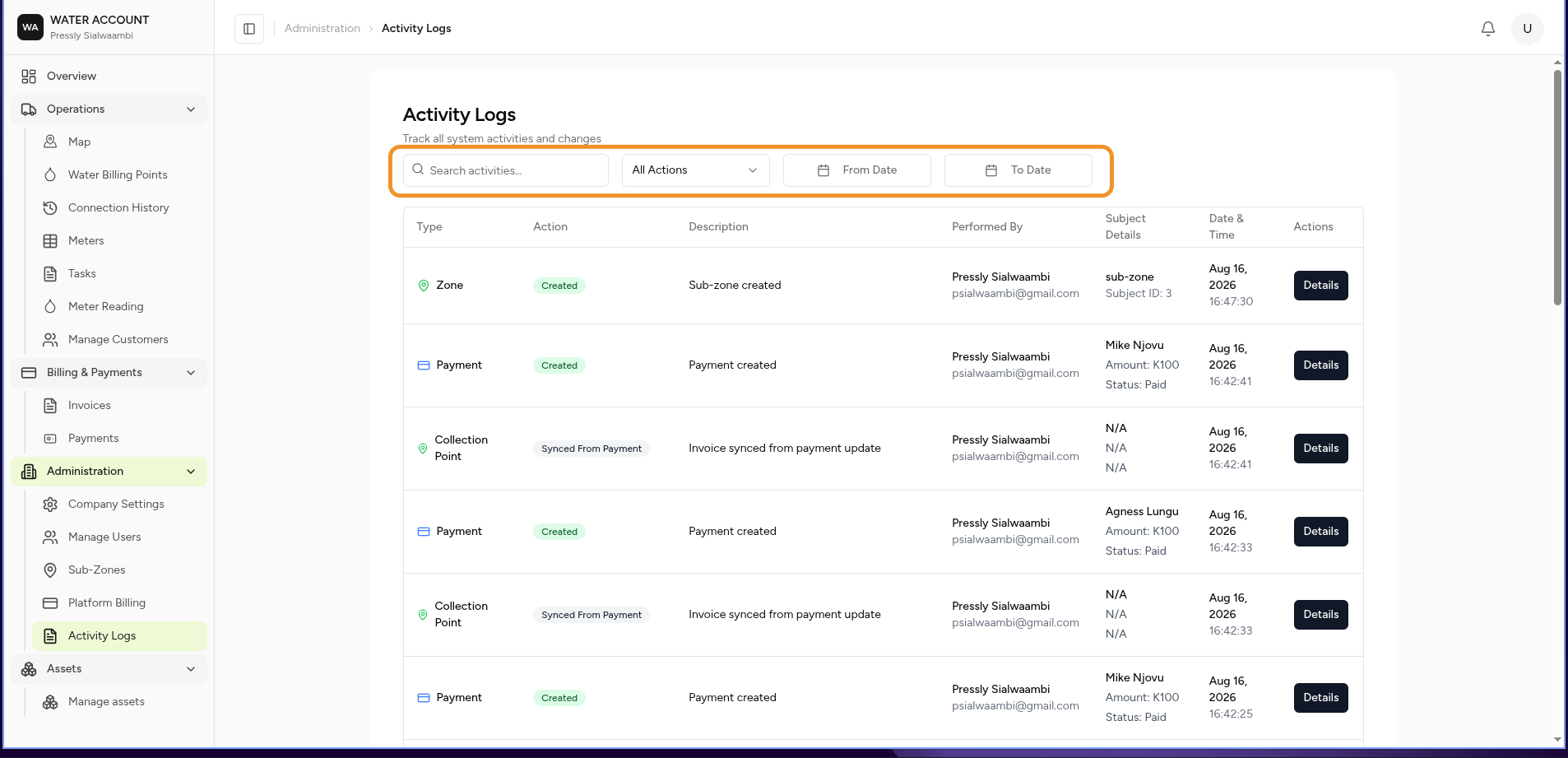
The page contains:
- Search
- Filters
- Activity Register
- Details View
Search Activities
Use search to find specific activity records.
Search examples:
Invoice generated
Customer created
mike@cleancitywaste.com
Filters
Action Filter
Filter activities by the type of action performed.
Examples:
| Action | Description |
|---|---|
| Created | New record created |
| Updated | Existing record changed |
| Deleted | Record removed |
| Generated | System generated information |
| Login | User signed into the platform |
Date Filters
Use date filters to view activity within a specific period.
Example:
From:
01/07/2026

To:
31/07/2026
Activity Register
Each row represents a system event.
| Column | Description |
|---|---|
| Type | Area where the action happened |
| Action | Activity performed |
| Description | Explanation of the event |
| Performed By | User responsible |
| Subject Details | Related record information |
| Date & Time | When the event occurred |
| Actions | Available options |
Activity Types
Common activity types include:
Collection Point
Examples:
Collection Point Created

Collection Point Invoice Generated
Used when managing customer service locations.
Collection
Examples:
Collection Recorded

Collection Missed
Used when tracking garbage collection activity.
User
Examples:
User Login

User Created

User Updated
Used for tracking account activity.
Billing
Examples:
Invoice Generated

Payment Recorded

Payment Approved
Viewing Activity Details
Select:
Details
to view the complete event information.
The details page may include:
- User information
- Date and time
- Action performed
- Previous values
- New values
- Related record information
Example:
Action:
Created

Type:
Collection Point

Performed By:
mike njovu

Customer:
Jack Tembo

Address:
Corner House

Time:
30/06/2026 13:24:15
Expected Behaviour
The system should:
- Record important user actions automatically.
- Store the user responsible for each action.
- Preserve historical activity records.
- Allow administrators to search previous events.
- Provide enough information to investigate issues.
Business Rules
- Activity logs cannot be edited manually.
- Activity history should not be deleted.
- All important changes must create an audit record.
- User permissions determine access to logs.
Example Audit Flow
User Creates Billing Point

        ↓

System Saves Record

        ↓

Activity Log Created

        ↓

Administrator Can Review:

Who?
  ↓
mike njovu

What?
  ↓
Created billing point

When?
  ↓
30 June 2026 13:24
Common Uses
Administrators use activity logs to:
Investigate Problems
Example:
"Who changed this customer's account?"
Verify Operations
Example:
"Were invoices generated successfully?"
Monitor Staff Activity
Example:
"Which user created this billing point?"
Related Pages
- Users
- Company Settings
- Garbage Billing Points
- Invoices
- Payments
- Garbage History