💳 Payments
Purpose Display customer payment records, payment status, verification status, collectors, approvals, and available payment actions.
Callouts
- Search and filters
- Payment actions
- Payment register
- Verification status
- Approval information
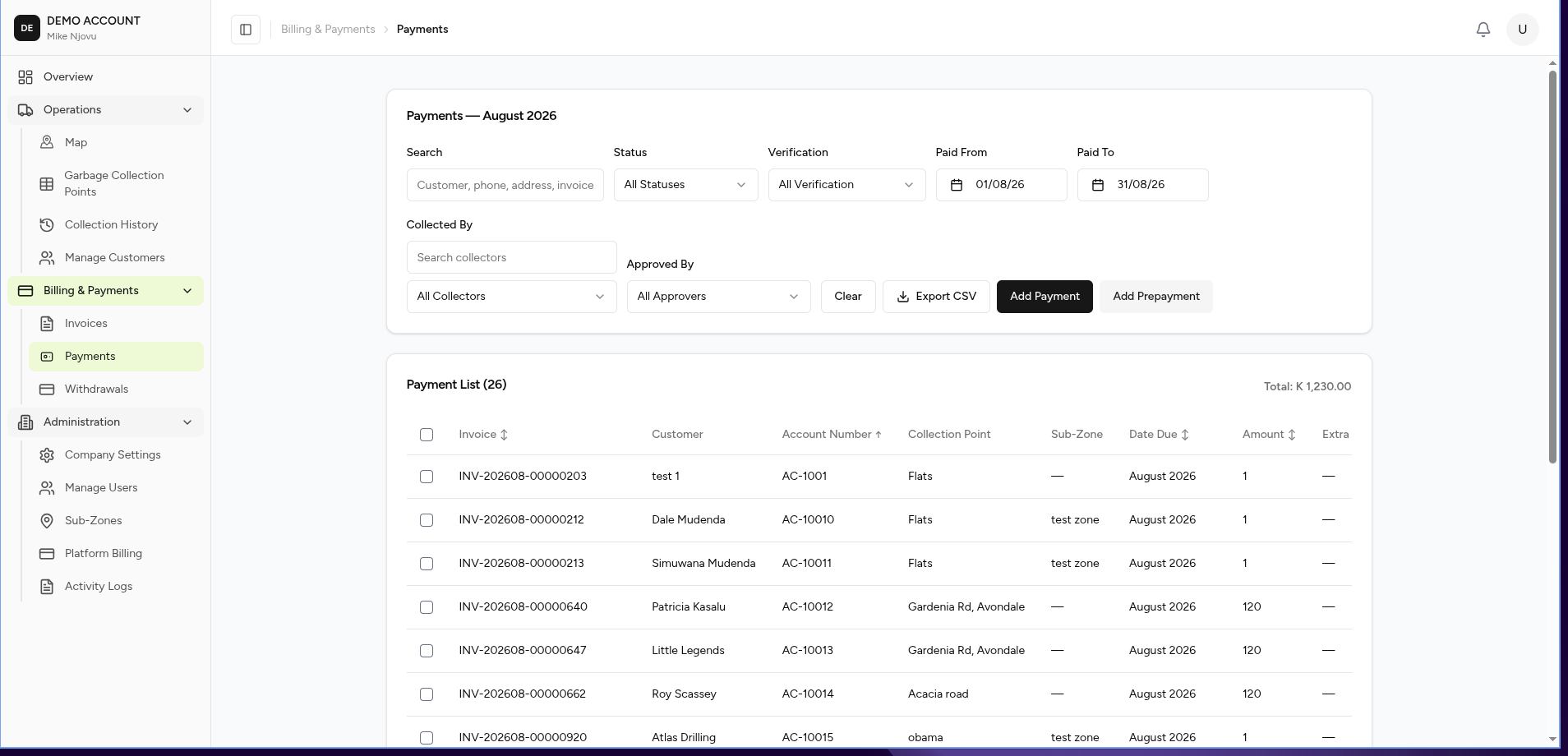
The Payments page provides a central location for managing all customer payments received through the garbage billing system.
Users can review payments, search transactions, verify payments, track collectors, approve transactions, and record new payments.
What You Can Do
From this page you can:
- View all payments
- Search payments
- Filter payment records
- Add a payment
- Add a customer prepayment
- Verify transactions
- Review approval history
- Export payment data
Screen Layout
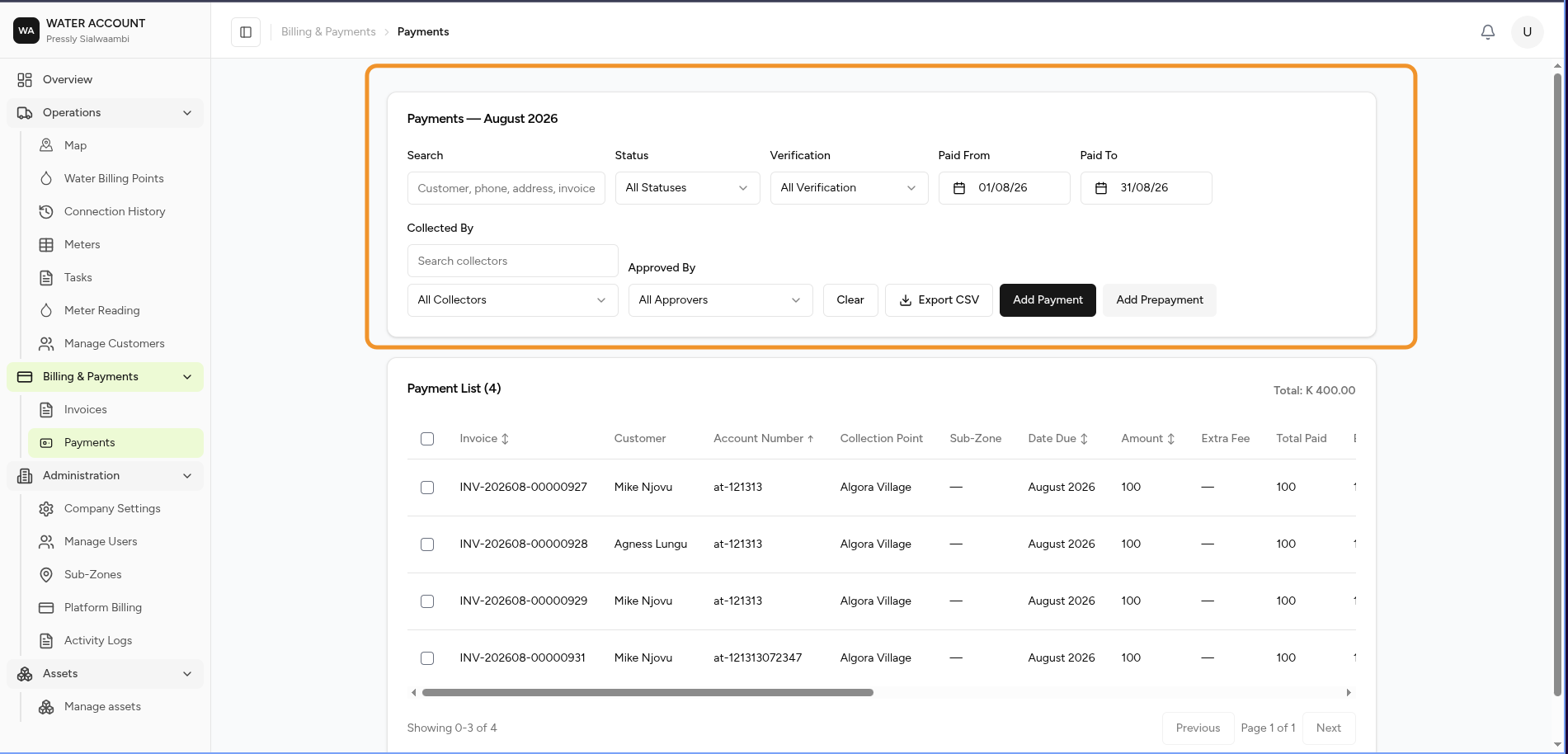
The page consists of:
- Search
- Filters
- Payment Actions
- Payment Register
- Payment Status
Search
Search payments using:
- Customer name
- Phone number
- Address
- Invoice number
Example:
Jack Tembo
or
INV-202607-00015942
Filters
Use filters to locate specific payment records.
| Filter | Description |
|---|---|
| Status | Payment status |
| Verification | Payment verification state |
| Paid From | Start date |
| Paid To | End date |
| Collected By | User who received the payment |
| Approved By | User who approved the payment |
Select Clear to reset all filters.
Payment Actions
Add Payment
Creates a new payment against a customer invoice or billing point.
Common workflow:
Select Customer

↓

Select Invoice

↓

Enter Payment Details

↓

Select Payment Method

↓

Save Payment

↓

Verification
Add Prepayment
Records money received before an invoice is generated.
Example:
A customer pays in advance for future garbage collection services.
The amount remains available as credit until applied to an invoice.
Payment Register
Each row represents a customer payment transaction.
The register displays:
| Column | Description |
|---|---|
| Customer | Customer who made payment |
| Collection Point | Service location |
| Sub-Zone | Operational area |
| Extra Fee | Additional charges |
| Total Paid | Amount received |
| Balance | Remaining customer balance |
| Method | Payment method |
| Collected By | User who received payment |
| Verification | Payment verification status |
| Disbursement | Payment allocation status |
| Approved By | User who approved payment |
| Status | Current payment status |
| Actions | Available operations |
Payment Status
Payments may have different statuses.
| Status | Meaning |
|---|---|
| Pending | Payment entered but not completed |
| Verified | Payment has been confirmed |
| Approved | Payment approved for processing |
| Completed | Payment fully processed |
| Rejected | Payment failed verification |
Verification
Payment verification ensures that recorded payments match the actual received funds.
Verification may include:
- Confirming payment reference
- Checking transaction details
- Reviewing supporting information
- Approving or rejecting payment
Expected Behaviour
The system should:
- Display payments matching selected filters.
- Update totals after new payments are added.
- Track who collected each payment.
- Track who approved each payment.
- Maintain payment history.
- Link payments to customers and invoices.
Business Rules
- Every payment must belong to a customer.
- Payments may be linked to an invoice or stored as prepayment credit.
- Approved payments cannot be edited without proper permission.
- Payment history must be retained for auditing.
- All payment actions should appear in the Activity Log.
Typical Payment Workflow
Customer Receives Invoice

        ↓

Customer Makes Payment

        ↓

Payment Recorded

        ↓

Payment Verified

        ↓

Payment Approved

        ↓

Invoice Balance Updated

        ↓

Receipt Generated
Common Tasks
- ➜ Add Payment
- ➜ Add Prepayment
- ➜ Verify Payment
- ➜ Approve Payment
- ➜ View Customer Payment History
Related Pages
- Invoices
- Customers
- Garbage Billing Points
- Reports
- Activity Log