🗺️ Operations Map Overview
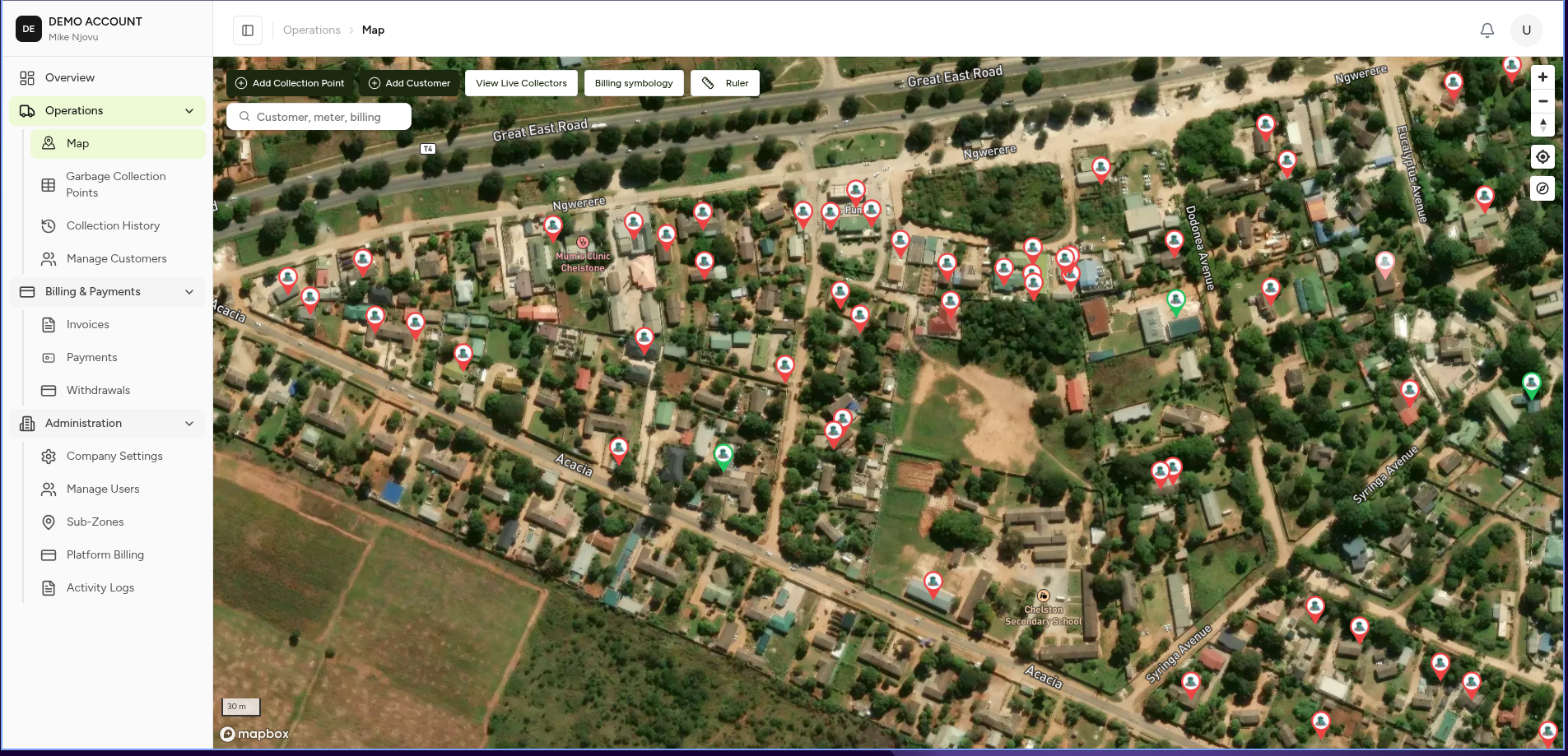
The Operations Map is the central location-based workspace in MapBilling.
It provides a visual view of company operations by displaying customers and billing points directly on a map.
Instead of searching through lists only, users can locate and manage operational data based on real-world locations.
Understanding the Map Screen
The map consists of several main areas:
+------------------------------------------------+
| Top Actions                                     |
+------------------------------------------------+
| Sidebar       |                                |
| Navigation    |       Interactive Map           |
|               |                                |
|               |                                |
+------------------------------------------------+
1. Navigation Sidebar
The left navigation provides access to operational modules.
Operations
Operations

├── Map
├── Garbage Billing Points
├── Garbage History
└── Manage Customers
These modules represent daily operational activities.
Map
The map provides a visual overview of all location-based records.
Users can:
- Locate customers.
- View billing points.
- Open records directly from the map.
Garbage Billing Points
Displays customer service locations.
Example:
Billing Point

Customer:
Jack Tembo

Address:
Corner House

Status:
Active
Users can:
- View locations.
- Open customer details.
- Check billing status.
Garbage History
Shows collection activity recorded against billing points.
Examples:
- Collection completed.
- Collection missed.
- Billing point created.
- Service disconnected.
Manage Customers
Provides access to customer records.
Users can:
- Find customers.
- Update information.
- View billing points.
- View payment history.
2. Map Controls
The map provides tools for navigation and data viewing.
Search
Search allows users to locate records by:
- Account number
- Customer name
- Address
- Billing point
Example:
Search:
Corner House
The map moves to the matching location.
Layers
📷 Screenshot Placeholder
Image:
garbage-map-layers.png
Layers control what information is displayed.
Example:
Layers

☑ Billing Points

☑ Customers
Users can turn information on or off depending on the task.
3. Map Markers
Each location on the map represents an operational record.
Billing Point
Represents:
- Customer connection
- Service location
- Billing information
4. Map Interaction
Users can interact directly with map objects.
Example:
Click Billing Point

        ↓

Information Panel Opens

        ↓

View Details

        ↓

Take Action
Example: Locate a Customer's Billing Point From the Map
Workflow:
Open Operations Map

        ↓

Search Customer

        ↓

Map Moves to Location

        ↓

Click Billing Point Marker

        ↓

View Details
Map Use Cases
Field Operations
Find:
- Customers
- Billing points
Complete:
- Collection visits
- Inspections
Management
Analyse:
- Service coverage
- Operational areas
Customer Support
Quickly answer:
"Where is this customer's collection point?"
by searching and opening the map location.
Expected Behaviour
The map should:
✅ Load the company's operational area.
✅ Display available layers.
✅ Allow users to search records.
✅ Open details when objects are selected.
✅ Respect user permissions.
Related Pages
- Garbage Billing Points
- Garbage History
- Customers
- Activity Log