💧 Water Billing Points
Purpose Display all water billing points, including customer information, connection details, meter assignment, billing status, and available actions.
Callouts
- Page actions
- Search
- Filters
- Billing point register
- Row actions
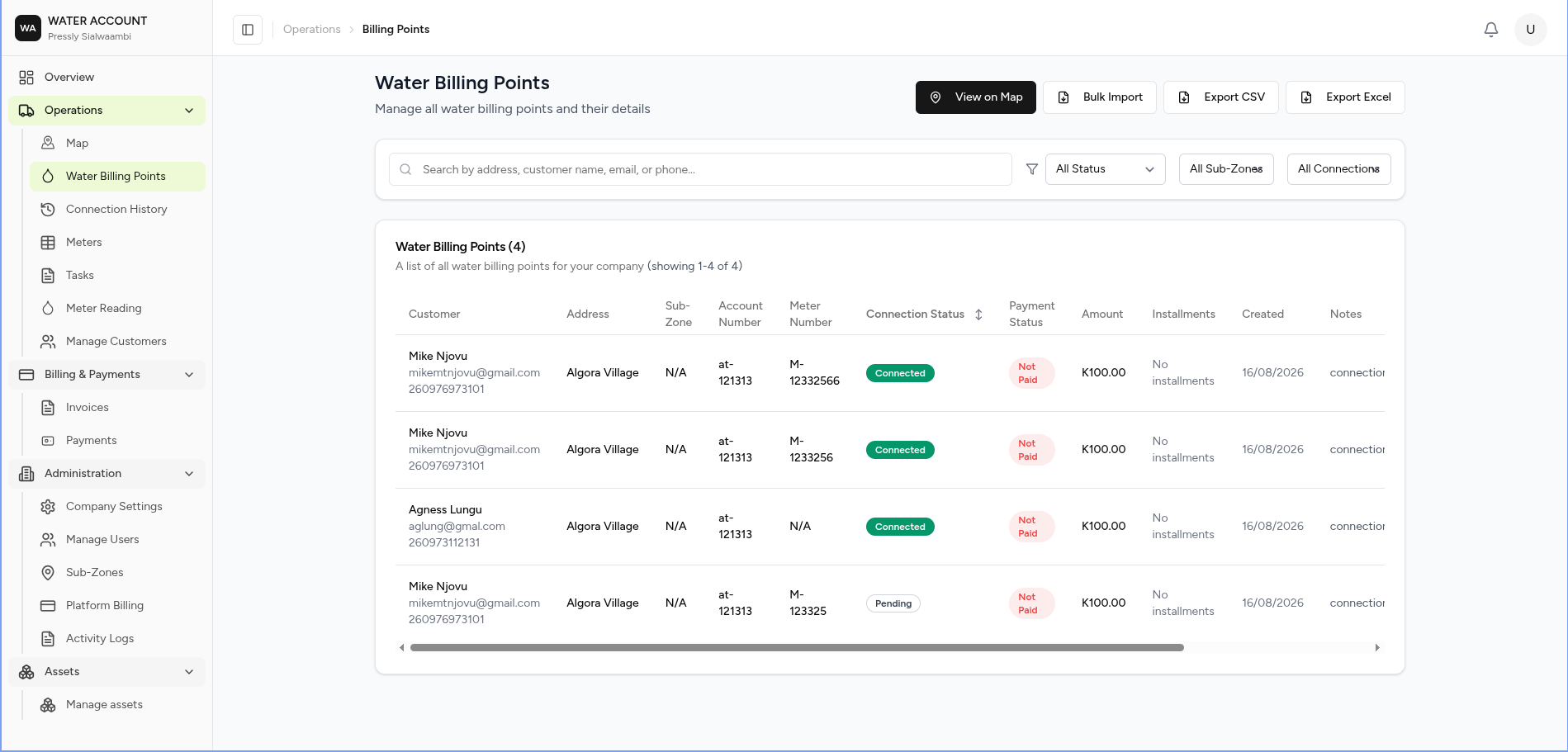
Water Billing Points represent the physical locations where water services are provided and billed.
Each billing point links a customer to a service location and stores information such as the connection type, assigned meter (if applicable), account number, billing status, and payment information.
What is a Water Billing Point?
A Water Billing Point is the primary record used to manage water service delivery.
It acts as the connection between:
- 👤 Customer
- 📍 Service Address
- 🚰 Water Connection
- 💧 Water Meter (for metered services)
- 🧾 Billing
- 💳 Payments
flowchart LR

A[Customer]
--> B[Water Billing Point]

B --> C[Meter]
B --> D[Invoices]
B --> E[Payments]
B --> F[Service Address]
Every customer service location should have a billing point.
What You Can Do
From this page you can:
- View all billing points
- Search for customers or addresses
- Filter billing points
- View billing point details
- Open the map
- Import billing points
- Export billing points
- Manage customer connections
Screen Layout
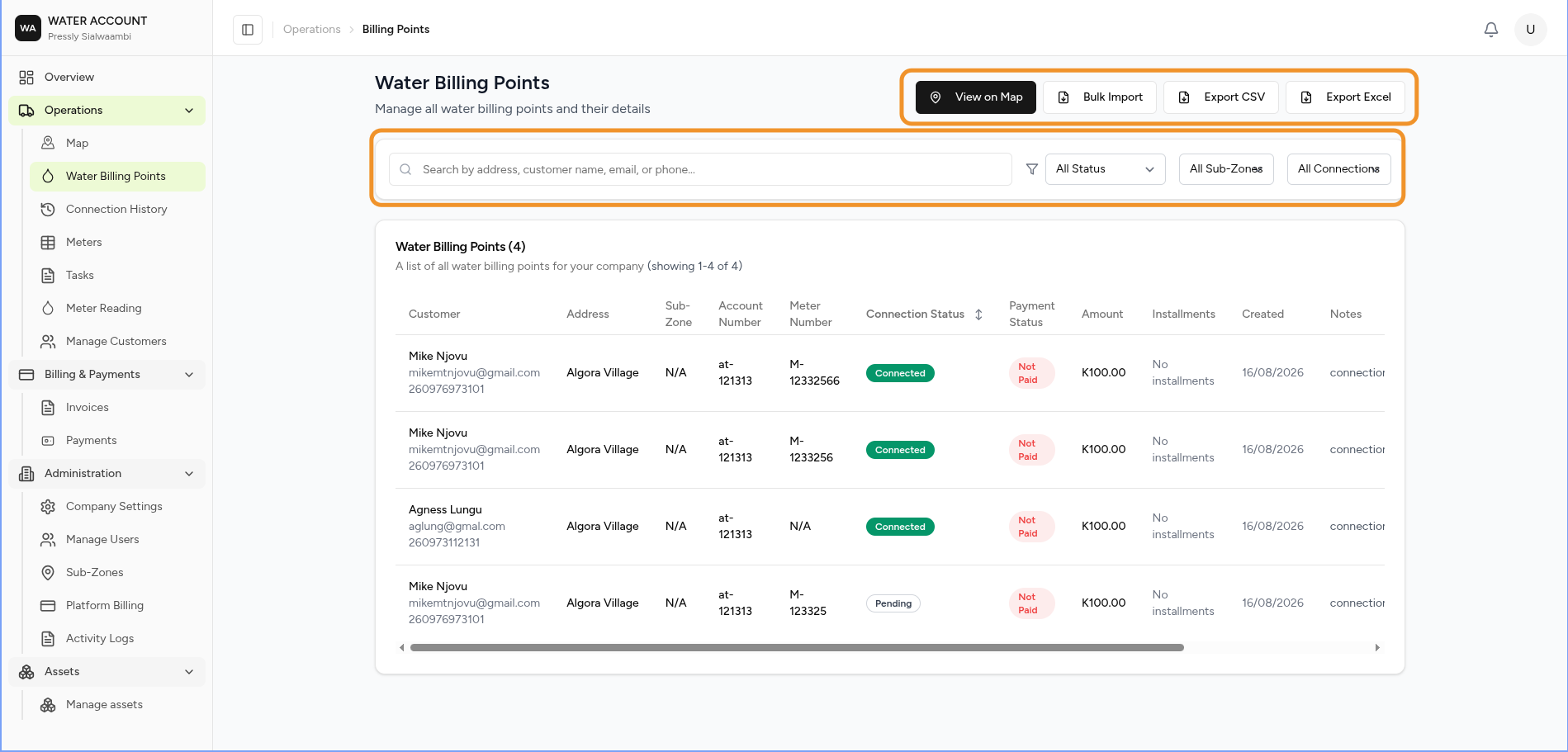
The page contains:
- Action Bar
- Search
- Filters
- Billing Point Register
- Actions
Page Actions
The toolbar provides quick access to common actions.
| Action | Description |
|---|---|
| View on Map | Display billing points on the interactive map |
| Bulk Import | Import billing points from a file |
| Export CSV | Export billing point data as CSV |
| Export Excel | Export billing point data as Excel |
Search
Search billing points using:
- Customer name
- Email address
- Phone number
- Service address
Search results update the register to display matching records.
Filters
Use filters to narrow the list.
Available filters include:
| Filter | Description |
|---|---|
| Status | Connection status |
| Sub-Zone | Geographic service area |
| Connection Type | Metered or Unmetered |
Filters can be combined to quickly locate billing points.
Billing Point Register
Each row represents a customer service location.
The register displays:
| Column | Description |
|---|---|
| Customer | Customer details |
| Address | Service location |
| Sub-Zone | Assigned operational zone |
| Account Number | Customer account reference |
| Meter Number | Linked water meter |
| Connection Status | Current service status |
| Payment Status | Invoice payment status |
| Amount | Outstanding or current amount |
| Installments | Payment arrangement |
| Created | Date created |
| Notes | Additional information |
| Actions | Available operations |
Connection Types
A billing point can be configured as one of two connection types.
Metered
Water usage is measured using a physical meter.
Characteristics:
- Meter assigned
- Meter readings recorded
- Bills generated from consumption
Unmetered
Water usage is not measured by a meter.
Characteristics:
- No meter assigned
- Fixed billing rules may apply
- Meter readings are not required
Meter Assignment
Only Metered billing points can have a water meter assigned.
📖 To learn how to install a meter, see Adding a Meter.
Common Actions
Depending on your permissions, you can:
- View billing point details
- View customer information
- Open the location on the map
- Install or view a meter
- View invoices
- View payment history
Expected Behaviour
The system should:
- Display all billing points by default.
- Apply search and filters immediately.
- Show the correct connection type.
- Display the linked meter for metered services.
- Display N/A where a meter has not been assigned.
- Update the register when records are created or edited.
Business Rules
- Every billing point must belong to a customer.
- Every billing point must have a service address.
- A billing point can be Metered or Unmetered.
- Only metered billing points can have a meter assigned.
- Billing and payments are linked to the billing point.
Common Tasks
- ➜ Create a Billing Point
- ➜ Add a Meter
- ➜ Record a Meter Reading
- ➜ View Billing Details
- ➜ View Payment History
Related Pages
- Customers
- Meters
- Adding a Meter
- Meter Readings
- Billing
- Payments
- Dashboard