📱 Water Works
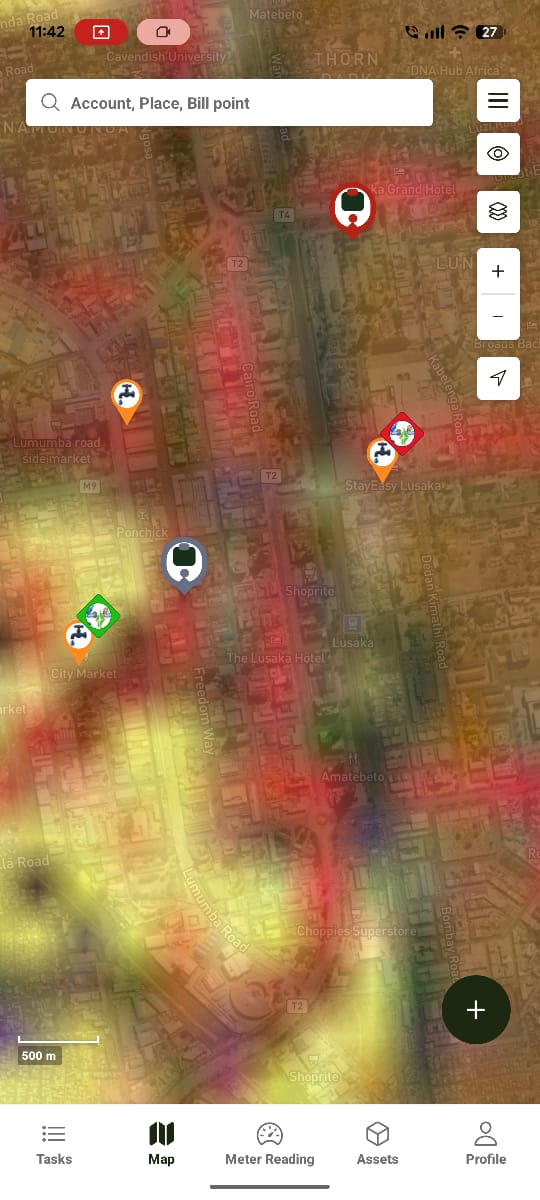
Water Works enables field teams to perform operational tasks directly from their mobile devices.
Instead of returning to the office, users can manage tasks, view the map, capture meter readings, inspect assets, and complete assigned work while in the field.
The application works both online and offline, automatically synchronising changes when an internet connection becomes available.
Who Uses Water Works?
Water Works is built for water utility companies, for the field staff who actually perform the work — primarily:
- Connection/Disconnection Technicians — install, connect, and disconnect water meters
- Plumbers — general field plumbing work
It's also used by:
- Meter Readers
- Payment Agents
- Field Technicians
- Customer Service Officers
- Inspectors
- Supervisors
Each user sees features based on their assigned role — see Tasks below for how visibility is scoped.
The 5 Core Modules
Water Works is organised around five modules: Tasks, Map, Meter Readings, Assets, and Profile.
Water Works

├── Tasks
├── Map
├── Meter Readings
├── Assets
└── Profile
Tasks
Tasks connect office staff with field workers by assigning specific jobs to a location and a person. Company Administrators see all tasks; Agents and other non-admin roles see only the tasks assigned to them.
➜ See Tasks (Mobile) for the full walkthrough.
Map
The mobile map mirrors the web map, showing billing points, tasks, and meters as markers, with a layers control and an offline download menu.
➜ See Map (Mobile) for the full walkthrough.
Meter Readings
Where field workers capture meter readings, reached from a meter marker on the map. Shows the same offline badge used on the Map screen.
➜ See Meter Readings (Mobile) for the full walkthrough.
Assets
Browse asset classes and individual assets, view details, navigate to an asset, and raise a task directly from it.
➜ See Assets (Mobile) for the full walkthrough.
Profile
A minor module — account details and app settings for the logged-in user.
➜ See Profile (Mobile).
Offline Capability
The mobile application continues working without internet access.
Available offline:
- Tasks
- Map
- Assets
All of the above read from data stored on the device, so they load instantly while offline. When connectivity returns, pending changes are synchronised automatically — see Offline Maps for the full flow, including the Sync Queue.
GPS Integration
The application uses the device's GPS to:
- Locate users
- Navigate to assets and billing points (Get Directions)
- Verify visit locations
- Record work locations
Camera Integration
Users can attach photographs to records.
Examples include:
- Meter installations
- Damaged assets
- Customer connections
- Maintenance work
Notifications
The application can notify users of:
- New assignments
- Synchronisation status
- Failed uploads
- Payment confirmations
- System announcements
Security
The mobile app includes:
- Secure login
- Role-based access
- Offline encryption
- Activity tracking
- Secure synchronisation
Expected Behaviour
The application should:
- Operate with limited connectivity.
- Continue working offline for Tasks, Map, and Assets.
- Prevent duplicate submissions.
- Synchronise data automatically once online.
- Display progress during uploads.
- Protect customer information.
Related Pages
- Tasks (Mobile)
- Map (Mobile)
- Meter Readings (Mobile)
- Assets (Mobile)
- Profile (Mobile)
- Offline Maps
- Tasks (Web) — the web equivalent of the mobile Tasks module
- Dashboard